
AI-Kit · Architecture
Deploy an AI Backend for WordPress Without Giving Up Control
On-device AI is a strong default, but it is not the answer for every browser, workload, or knowledge-driven experience. AI-Kit adds an optional backend path that can run in the customer’s own AWS account, giving WordPress teams a controlled fallback and a foundation for grounded chatbot and DocSearch features.
The architecture
Add a backend for specific requirements, not because every AI feature needs one.
Local-first remains available
Supported browser workflows can continue to run on the device without sending ordinary editing tasks to a remote model.
AWS handles the runtime
API endpoints, Lambda functions, storage, and retrieval resources can be deployed into the customer’s AWS account, with model inference provided through Amazon Bedrock.
WordPress stays the control surface
Editors manage content and knowledge sources in WordPress while the backend performs protected processing and retrieval.
01 · Decision
When does a WordPress site need an AI backend?
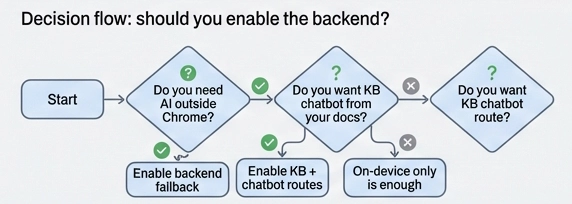
A backend becomes useful when browser support must be broader, a workload exceeds the on-device capabilities, or visitors need consistent behavior across devices. AI-Kit’s knowledge-base search and source-backed chatbot answers also use the configured backend to retrieve relevant documents.
Not every site needs this layer. A small editorial site may be well served by local tools alone, while a documentation portal or customer-facing assistant usually benefits from a reliable protected runtime.
- Choose fallback when local execution should remain the preferred path.
- Choose backend-only when consistency matters more than device-local processing.
- Add retrieval when answers must be tied to approved source content.
The right design is the smallest architecture that satisfies the actual workflow and governance requirements. For the problem-level decision, see how to use AI in WordPress without sending every draft through an AI SaaS.
02 · Ownership
What does customer-owned AWS change?
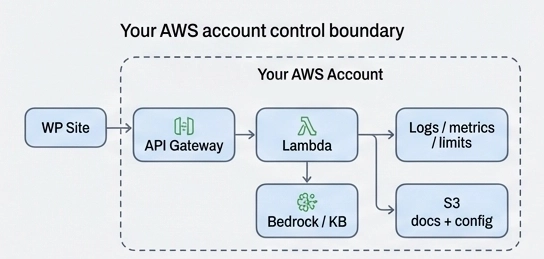
The backend is deployed into an AWS account controlled by the customer. That account owns the infrastructure, storage, service configuration, access policies, operational logs, and AWS usage charges.
WP Suite supplies the WordPress integration and deployment path, but it does not turn the customer’s backend into an opaque shared AI SaaS environment. This makes the technical and billing boundary easier to explain to agencies and enterprise customers.
- Documents and configuration can remain in customer-controlled storage.
- Admin and frontend APIs have separate authentication settings; only the required frontend capabilities need to be enabled.
- AWS service costs remain visible in the account where the stack runs.
Customer ownership does not remove the need for security design, monitoring, and retention decisions; it gives the customer the place and tools to make them. For the ownership trade-off, compare a customer-owned AWS AI backend with a SaaS AI API.
03 · Components
What capabilities belong in the backend layer?
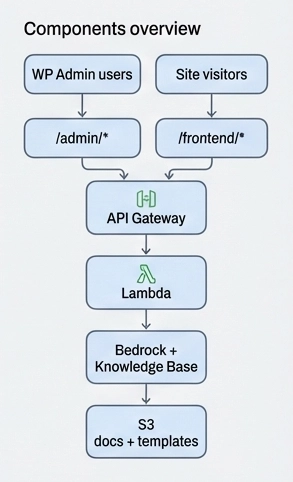
A typical AI-Kit backend combines protected API endpoints, Lambda-based processing, configuration and document storage in S3, model access through Amazon Bedrock, and optional retrieval components for knowledge-grounded responses.
The supplied stack separates admin and frontend API authentication. Admin operations can use IAM or Cognito; enabled frontend routes share their configured authentication mode. For a public chatbot, combine the required functionality with the configured reCAPTCHA, rate controls, and prompt restrictions.
- Separate admin and frontend API responsibilities.
- Keep prompt, policy, and retrieval configuration explicit and reviewable.
- Expose only the operations that the frontend experience actually needs.
This reduces the chance that a convenient public endpoint becomes a general-purpose AI proxy.
04 · Knowledge base
How do WordPress documents become grounded answers?
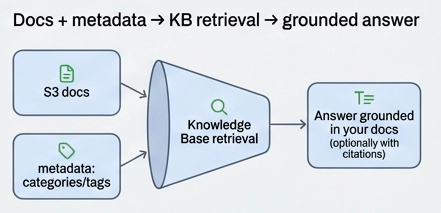
AI-Kit Pro can automatically synchronize selected, approved public WordPress content to the configured knowledge base on a schedule. Site publication can serve as approval, or the workflow can require a separate knowledge-base review. Drafts and unpublished update proposals are excluded, and separately maintained documents can also be included. KB Section controls let editors exclude content, split a page into separate sources, or preserve an intentionally overridden section.
After synchronization, the backend must finish indexing before new or changed content is available for retrieval, as described in the Amazon Bedrock synchronization documentation. DocSearch and chatbot requests then retrieve relevant source material; generated answers can cite those sources. The source links let visitors open the underlying documentation and check the answer.
- Curate the source set instead of ingesting every page blindly.
- Use categories, tags, and section boundaries where they improve retrieval.
- Choose whether publication approval is sufficient or knowledge-base changes need a separate review.
Retrieval quality depends as much on source structure and governance as it does on the model. For the complete retrieval path, see how to give visitors grounded answers with sources and the private AI and RAG backend architecture.
Control boundary
Owning the AWS account is a foundation, not a complete policy.
Define who may change prompts, publish knowledge sources, inspect logs, alter API exposure, and manage model access. Infrastructure ownership is most valuable when the operating responsibilities are equally clear.
Next step
Map the backend requirements before you deploy.
Review the AI-Kit product and architecture material, then use Deployment Access when the project is ready. This AWS Marketplace subscription provides access to WP Suite’s published CloudFormation stack. Quick Launch opens the WP Suite deployment wizard, which guides configuration and deployment into your own AWS account.