Deploy the AI-Kit AWS Backend (SAR): a Knowledge-Base chatbot and reliable AI fallback — in your own AWS account
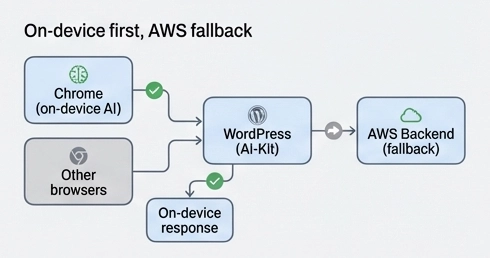
AI-Kit is built around a simple idea: use on-device AI whenever possible. That means the AI runs inside the visitor’s browser (Chrome, when supported), keeping content private and avoiding external AI API costs.
But WordPress sites in the real world need more than one path: visitors use different browsers, editors work on locked-down devices, and agencies often want a documentation-powered chatbot that answers from the company’s own knowledge base.
The AI-Kit AWS Backend solves this by adding an optional backend that you deploy into your own AWS account using the AWS Serverless Application Repository (SAR). It’s a practical middle ground: modern AI features with significantly more control than a typical AI SaaS provider.
AWS as PaaS (your account), not SaaS (someone else’s platform)
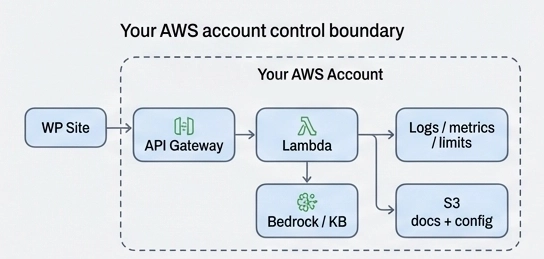
Yes, AWS is a third party — but it’s fundamentally different from “AI SaaS”. With SaaS, prompts and content typically flow into a vendor-managed system. With AI-Kit’s AWS backend, the infrastructure runs inside your AWS account.
Practically, that means:
- Your documents stay with you: content and configuration are stored in your S3 bucket.
- Your security rules apply: you decide authentication, access boundaries, and traffic limits.
- Your behavior is configurable: prompt templates and KB policies can be tuned without rebuilding WordPress code.
For site owners and agencies, this translates into clearer governance, easier compliance storytelling, and less dependence on a single vendor’s platform rules.
What you deploy with the AI-Kit AWS SAR template
The backend ships as an AWS Serverless Application Repository (SAR) application. SAR is AWS’s catalog for serverless deployments: you click Deploy, set a few parameters, and CloudFormation provisions the backend for you.
In plain terms, the deployment gives you:
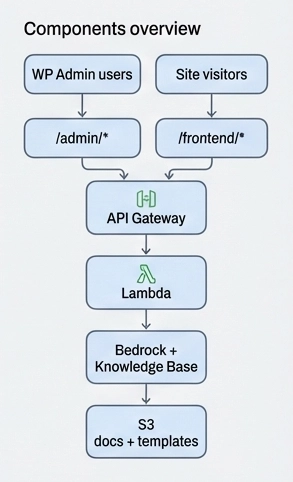
- API endpoints that WordPress can call (admin + optional frontend routes)
- Serverless compute to generate responses (AWS-managed scaling)
- S3 storage for documentation + editable configuration files
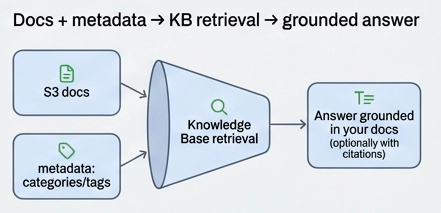
- Knowledge Base (optional) for doc-grounded answers (RAG)
- Protection options for anything exposed to the public web
The important takeaway: you get a backend that’s ready to run — and it’s still fully owned by your AWS account.
When should you enable the backend?
You don’t need the AWS backend for every site — and that’s intentional. The default on-device setup remains the simplest and most privacy-forward option.
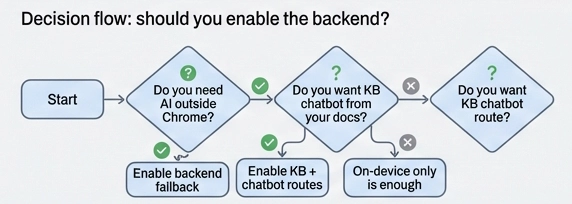
Enable the backend if one or more of these apply:
- Browser coverage: you want AI features to work even when on-device AI isn’t available.
- Reliability: you want a stable fallback path for heavier or longer requests.
- Knowledge Base chatbot: you want answers grounded in your docs instead of generic web knowledge.
- Agency standardization: you want consistent behavior across multiple client sites.
For many sites, the ideal setup is on-device first, backend only when needed.
Step-by-step: deploying from AWS Serverless Application Repository (SAR)
You can deploy the AI-Kit AWS Backend in minutes. The flow is:- Open AWS Serverless Application Repository in the AWS Console.
- In Available applications, search for
wpsuite-ai-kitand enable “Show apps that create custom IAM roles or resource policies” (the template provisions IAM resources). - Select a region where Amazon Bedrock is available for your AWS account.
- Set the key parameters (below).
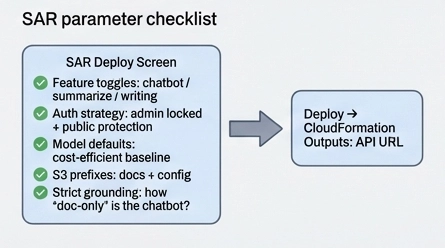
- Click Deploy — CloudFormation provisions resources and shows outputs (API URL, bucket names, etc.).
The only parameters most teams need to think about
- Feature toggles: enable only what you use (chatbot, summarizer, writing tools). Less surface area = simpler security + costs.
- Authentication strategy: keep admin endpoints locked down; decide how to protect public endpoints (auth and/or bot protection).
- Model defaults: choose cost-efficient baseline models and upgrade only when quality requirements justify it.
- Docs & config storage: where documentation and editable templates live in S3 (prefixes).
- Strict grounding: choose whether the chatbot may answer without documentation support, or must ask clarifying questions / refuse when the KB doesn’t cover it.
Connecting WordPress to the backend
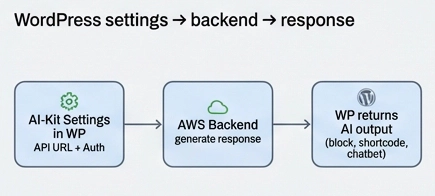
After deployment, CloudFormation provides an API base URL.
Paste it into AI-Kit settings (Pro) and select your authentication method.
From then on, AI-Kit can:
- use on-device AI first (when supported)
- fall back to AWS when needed
- enable a Knowledge Base chatbot grounded in your documentation
For non-technical teams, the experience stays simple.
Behind the scenes, you gain a scalable backend that you fully control.
Your Knowledge Base: answers from your docs, not the public web
A Knowledge Base chatbot is most valuable when it stays on-message and avoids hallucinations.
AI-Kit’s backend is designed to answer using your documentation stored in S3,
retrieved through a Bedrock Knowledge Base (RAG).
This is especially useful for:
- product documentation and “how it works” pages
- pricing and plan differences
- setup guides and troubleshooting
- agency onboarding documentation
With well-structured docs and consistent metadata (categories/tags),
you can get excellent knowledge-grounded answers without relying on expensive “reasoning-only” models.
Editable prompts and policies: real control without custom development
One standout advantage is how configurable the backend is. Prompt templates and Knowledge Base rules are stored as simple text/YAML files in S3.- Prompt templates define how questions are interpreted and how answers are produced.
- Metadata policies define allowed categories/tags and how strict grounding should be.
Pro Tips & Common Mistakes
Pro Tips
- Start strict, then relax: if your chatbot must follow documentation, begin with strict grounding. It’s easier to loosen rules later than to rebuild trust after inaccurate answers.
- Expose fewer public routes: only enable backend features you truly need for visitors. Smaller surface area means simpler security and lower cost risk.
- Metadata beats “bigger models” surprisingly often: consistent categories and tags can improve retrieval quality more than switching to a more expensive model.
- Create a reusable agency baseline: standardize deployment parameters (auth + strictness + model defaults) across clients.
- Treat templates like operational config: version changes and review them intentionally — prompt changes are product changes.
Common Mistakes
- Deploying public endpoints without a protection strategy: if something is callable from the public web, protect it intentionally (auth and/or bot protection).
- Inconsistent categories/tags: messy metadata leads to weaker retrieval even when everything else is configured correctly.
- Expecting the model to “figure it out”: Knowledge Base quality depends heavily on document structure and metadata.
- Enabling everything by default: toggles exist for a reason — only switch on what you use.
- No iteration plan: prompt templates and KB policies are core to outcomes — plan for versioning and gradual improvement.
Key takeaways
- On-device first: AI-Kit prioritizes browser AI; AWS adds coverage and reliability.
- PaaS control: docs, config, and behavior stay in your AWS account.
- Knowledge grounding matters: great KB answers come from good docs + metadata — not only bigger models.
- Configurable behavior: templates and policies can be edited without rebuilding WordPress code.
- Deploy safely: enable only what you need and protect any public surface intentionally.